

+1 Speed Keyboard Escape, one of the popular simulation games on Roblox, recently received a brand-new update.
The ADMIN ABUSE + BALANCING Update officially launched on July 4, 2026, and is available for a limited time until July 6, 2026.
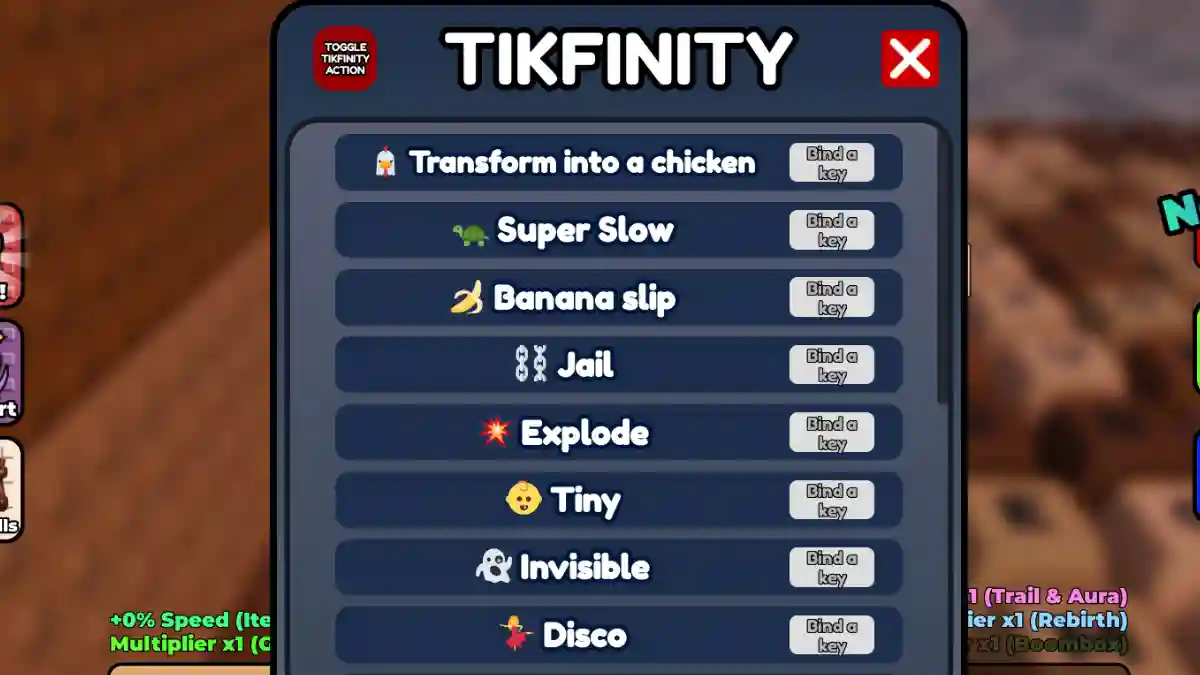
The update introduces several new features, including Tikfinity, a special in-game menu that lets players activate a variety of fun effects such as Banana Slip, Tiny Size, Invisible, Chicken, and more.

AI receipt scanner & cash envelopes. 100% private.
Before you can use any of these effects, you’ll first need to enable Tikfinity.
In this guide, you’ll learn how to enable and use Tikfinity in +1 Speed Keyboard Escape, including all the requirements and a complete step-by-step walkthrough.
How to enable Tikfinity in +1 Speed Keyboard Escape
- Join +1 Speed Keyboard Escape.
- Look at the top-right corner.
- Click the Tikfinity button.
- Click “Tikfinity: OFF” to turn it ON (turns green).
If the button is green, Tikfinity is active. If it’s gray/red or says OFF, your keybinds won’t do anything.
How to use Tikfinity keybinds
Once Tikfinity is ON, the menu shows several effects and their default keybinds.
- With Tikfinity ON, use these default keys:
- H — Banana Slip
- K — Chicken transform
- L — Super slow
- M — Tiny size
- N — Invisible
- Click the key field in the menu to change any bind.
- Must be green (ON) for keys to work.
- Press keys while playing (not in chat).
