

Adopt Me has released a brand-new update on Roblox.
While it isn’t a major content update, it introduces several new features, including new pets, the Trading Hub Phone, and other items that players can access.
In Adopt Me, every pet has its own rarity and can be aged by completing needs such as feeding, sleeping, bathing, going to school, and more.

AI receipt scanner & cash envelopes. 100% private.
As pets grow older, they can be transformed into Neon and Mega Neon versions, making them even more valuable.
In this guide, you’ll learn how to get the Trading Hub Phone in Adopt Me, along with how to use it and everything else you need to know.
Adopt Me Trading Hub Phone: How to Get & Use
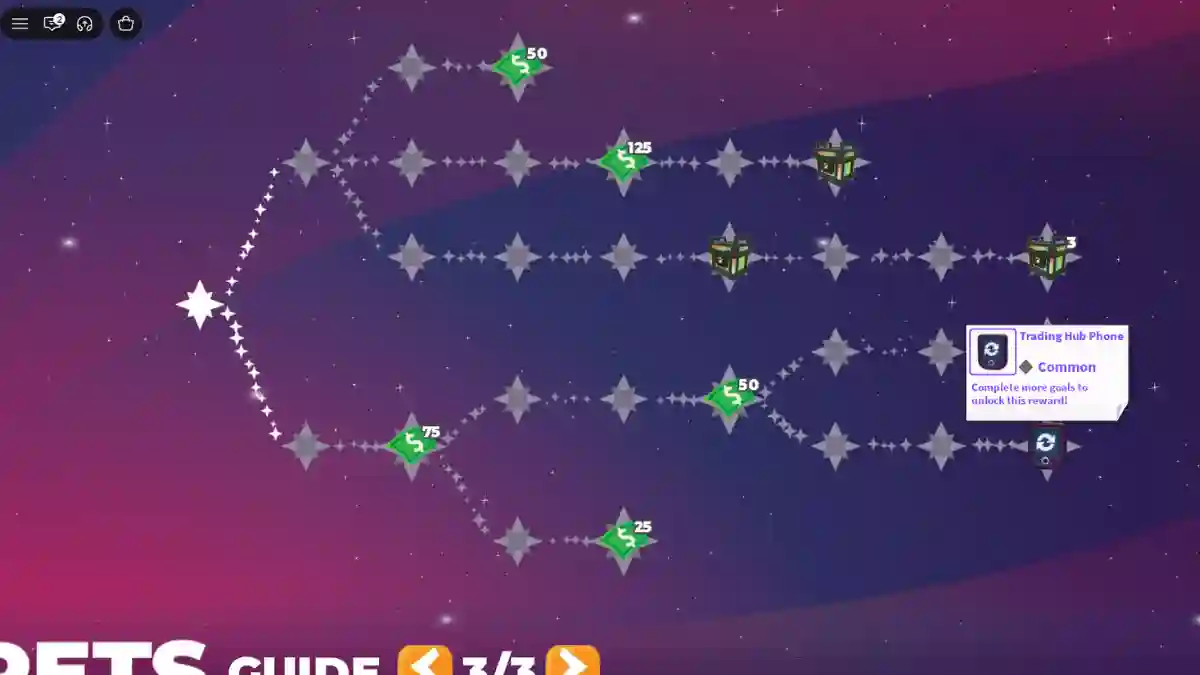
To get the Trading Hub Phone in Adopt Me, you must first complete two requirements before it becomes available to your account.
Step 1: Complete the Requirements
Open Guide → Pets → Page 3 and complete both tasks:
| Requirement | How to Complete |
|---|---|
| Get a Neon Pet | Raise 4 identical pets to Full Grown, then combine them in the Neon Cave. |
| Play the Game | Accumulate about 2 hours of total playtime. |
Step 2: Claim the Phone
After completing both requirements:
Backpack → Toys → Trading Hub Phone
How to Use the Trading Hub Phone
- Equip the Trading Hub Phone.
- Summon the Hot Air Balloon to travel to the Trading Hub.
Trading Hub NPCs
| NPC | Function |
|---|---|
| Robo Todd | Post trade listings (100 Bucks each, 2 active listings by default). |
| Robo Rob | Search for items or trades and receive similar suggestions if no exact match exists. |
Note: Pets listed for trade are locked until you remove the listing.
Use the Phone Anywhere
From any Adopt Me! server, you can:
- Check active trade listings.
- View trade offers.
- Browse trade history.
Note: You must visit the Trading Hub to create or edit trade listings.
