


When you start The Forge on Roblox, the first thing you do is pick a race to progress.
You can reroll races to try for different rarities. Each race has a different drop chance.
You play as a blacksmith who goes underground to mine ores with a pickaxe, forges weapons, and sells them to earn money.
Use that money to buy better pickaxes; these let you dig up rarer ores faster.
In this article, we explain how to get free race rerolls in The Forge, with a step-by-step guide.
How to Get Race Rerolls for Free in The Forge
Race rerolls are the only way to unlock new races in the game, just like getting new characters.
In The Forge, there are two ways to get race rerolls for free.
The first method is redeeming special codes, and the second is completing main quests.
Both of these give rerolls as rewards.
Method 1: List of Codes for Rerolls
Here’s the list of valid codes you can redeem in the game.
- BETARELEASE!—+2 Rerolls
- POSTRELEASEQNA—+1 Rerolls
- RELEASE—+2 Rerolls
- 20KLIKES—+2 Rerolls
- 15KLIKES—+2 Rerolls
- 10KLIKES—+2 Rerolls + Luck Totem
- 5KLIKES—+2 Rerolls + Miner Totem
Here are the steps to redeem the codes.
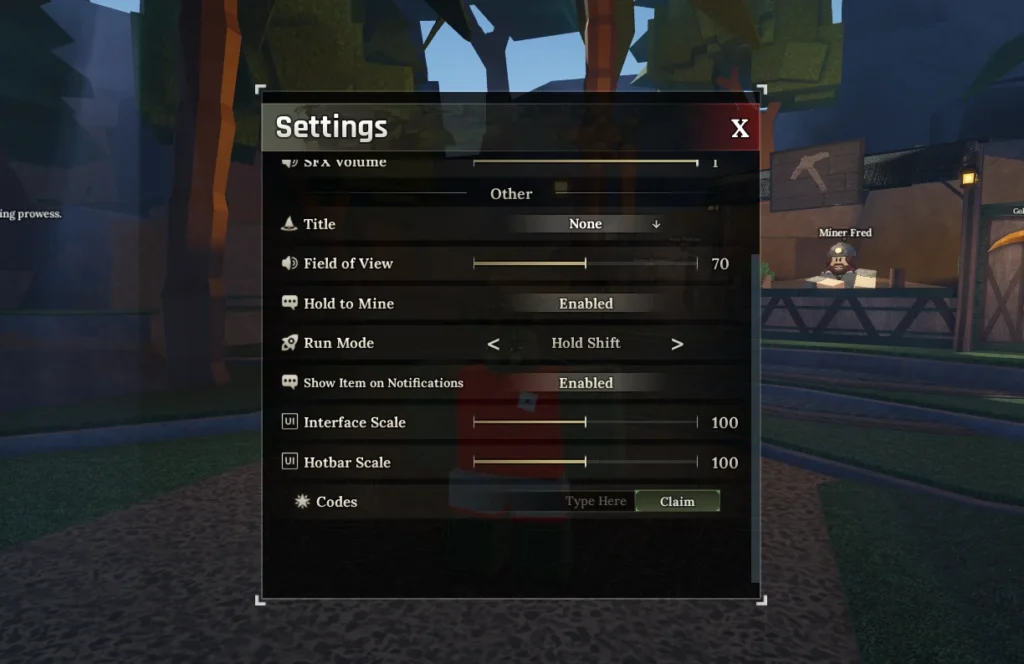
- Step 1: Open The Forge on Roblox
- Step 2: Click the gear icon (Settings) in the top-left corner
- Step 3: Scroll to the Codes section at the bottom
- Step 4: Copy & paste the code exactly (avoid spaces/typos)
- Step 5: Press the Claim button
Reward: Instant rerolls added to inventory
Method 2: Complete Main Quests (Free-to-Play)
While progressing through the main quests, you also have a good chance of earning Race Rerolls as rewards.
Below is a list of some quests and the rewards you receive from them.
| Quest Line | Location | Progress | Rewards |
|---|---|---|---|
| Captain Rowan | Forgotten Kingdom (World 2) | Early quests = Money/XP → Late quests =Rerolls | Increases with progression |
| Sensei Moro | Stonewake’s Cross (World 1) | Early-mid game | Some reroll drops |
| Wizard | Wizard Tower | Various | Occasional reroll rewards |
Bonus 3: Daily Login Bonus
You can also get 1 free reroll from the Daily Login reward.
However, this is only available for a limited time.
If you don’t receive it, you can still rely on the two methods mentioned above.
How to Use Your Rerolls
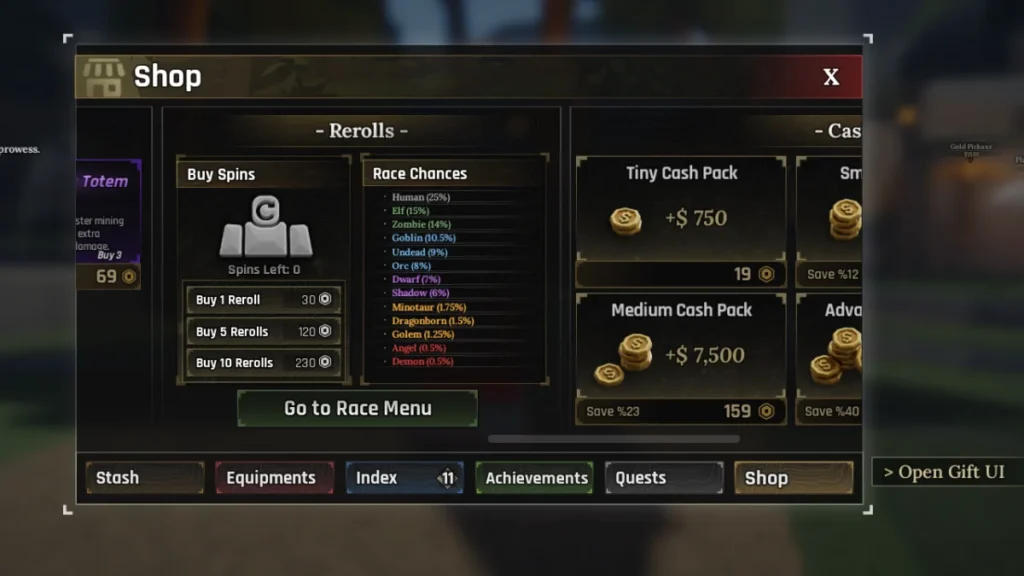
Once you have rerolls:
- Press “T” (Equipment Bag)
- Go to the “Shop tab.”
- Select Reroll or Race Menu
- Click the Reroll button to spin a new race
- Use rerolls until you get the desired S-tier race (Elf, Orc, Angel, Demon)
| Race | Bonus | Tier | Priority |
|---|---|---|---|
| Elf | +Speed | S | High |
| Orc | +Strength | S | High |
| Angel | +Defense | S | Medium |
| Demon | +Damage | S | Medium |
| Human | Balanced | C | Low |
