

Half-Life 2 is a first-person sci-fi game available on Steam for PC, and a direct sequel to Half-Life.
You play as Gordon Freeman, a scientist who awakens years after the Black Mesa incident and discovers that Earth has been conquered by an alien empire known as the Combine.
The story takes place in City 17, an occupied city where Gordon joins Alyx Vance and the human resistance in their fight to free Earth.

AI receipt scanner & cash envelopes. 100% private.
Throughout the game, you’ll travel through City 17, abandoned towns, canals, and other dangerous areas while battling Combine soldiers, alien creatures, and other threats.
In this guide, you’ll find the complete Half-Life 2 Console Commands and Cheat Codes, along with instructions on how to enable and use the console in the game.
How to enable and use the console
Step 1: Enable the Developer Console
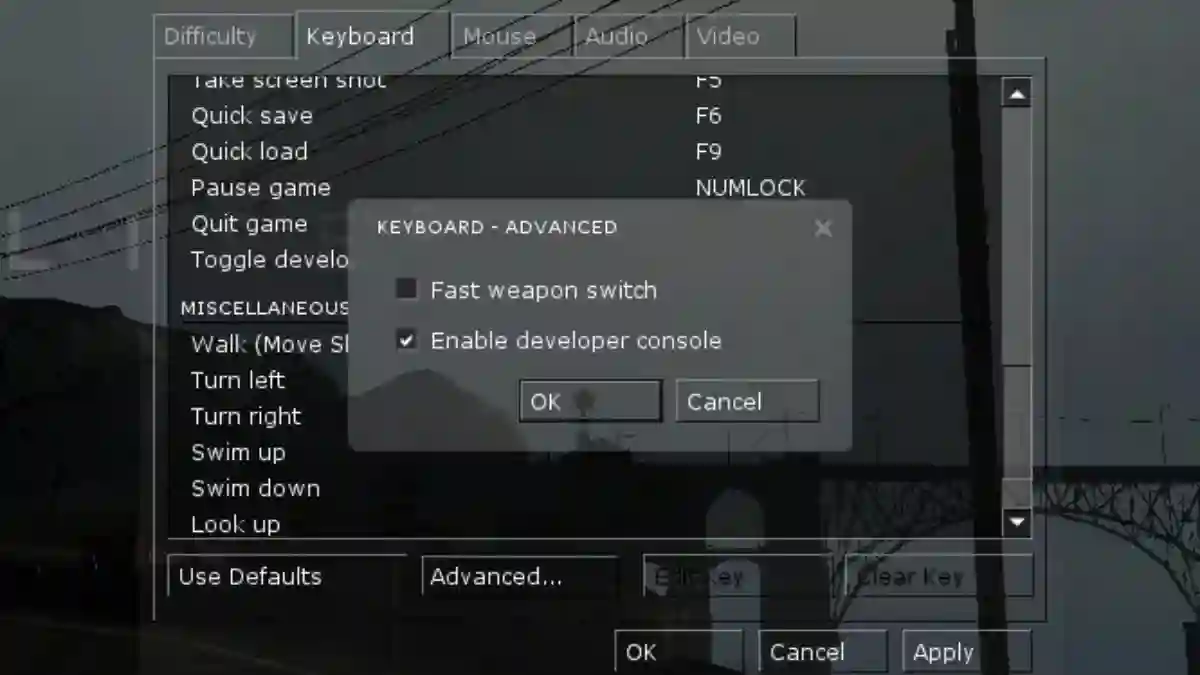
- Open Half-Life 2 and go to Options → Keyboard.
- Click Advanced… and check the box for “Enable Developer Console (~)”.
- Press the tilde key (
~) on your keyboard to open the console during gameplay.
Note: If the console doesn’t open, rebind the console toggle key under the Keyboard options menu.
Step 2: Enable Cheats
Open the console and type the following command to activate cheats:
bashsv_cheats 1
Note: To disable cheats at any time, type sv_cheats 0.
Some general commands do not require sv_cheats 1 to work. You can try running them first without enabling cheats.
Half-Life 2 Console Commands & Cheat Codes
Essential & General Cheats
| Command | Effect |
|---|---|
god | Invincibility (God Mode) |
buddha | Takes damage, but health never drops below 1 |
sv_infinite_aux_power 1 | Infinite Suit Power (Sprint, Flashlight, Oxygen) |
noclip | Fly through walls and terrain (Ghost Mode) |
sv_noclipspeed <number> | Adjust noclip movement speed |
notarget | NPCs ignore the player |
kill | Instant suicide |
npc_kill | Kills all NPCs in the immediate area |
ai_disable | Freezes all NPC movement and AI |
shake | Triggers camera shake effect |
impulse 101 | Gives all standard HL2 weapons and full ammo |
impulse 102 | Spawns human skulls |
Vehicle & World Spawning
| Command | Effect |
|---|---|
ch_createjeep or impulse 82 | Spawns the Scout Car (Jeep) |
ch_createairboat or impulse 83 | Spawns the Airboat |
ent_fire prop_vehicle_airboat enablegun 1 | Equips the mounted gun onto the Airboat |
physcannon_mega_enabled 1 | Equips the Supercharged (Dark Matter) Gravity Gun |
physcannon_maxforce <number> | Adjusts Gravity Gun launch force |
ent_fire !picker ignite | Ignites whatever object or NPC you are aiming at |
impulse 203 | Deletes the entity you are looking at |
ent_remove | Removes the aimed entity |
Weapons & Spawning
To spawn weapons, use give <weapon_name>.
bashgive weapon_physcannon
Weapon List
weapon_crowbar— Crowbarweapon_physcannon— Gravity Gunweapon_stunstick— Stunstick (Restores +7% Suit Power on pickup)weapon_pistol— 9mm Pistolweapon_357— .357 Magnumweapon_smg1— Submachine Gun (SMG)weapon_ar2— Overwatch Pulse Rifleweapon_shotgun— Shotgunweapon_crossbow— Crossbowweapon_frag— Fragmentation Grenadeweapon_rpg— RPG Rocket Launcherweapon_bugbait— Pheropods (Bugbait)weapon_alyxgun— Alyx’s Pistol (Must pick up off ground)weapon_annabelle— Father Grigori’s Rifleweapon_cubemap— Level Design Mapping Tool
Episode / Bonus Weapons
weapon_portalgun— Portal Gun (Portal only)weapon_hopwire— Hopwire Grenadeweapon_striderbuster— Strider Buster (EP1 / EP2)weapon_oldmanharpoon— Harpoon Launcher (Lost Coast only)weapon_citizensuitcase— Suitcaseweapon_citizenpackage— Cardboard Box Package
Remove a Specific Weapon:
Use ent_remove <weapon_name> (e.g., ent_remove weapon_crossbow).
Items & Ammo Commands
Use give <item_name> or ent_create <item_name>:
| Command | Description |
|---|---|
givecurrentammo | Gives full ammo for the currently held weapon |
give item_healthkit | Health Kit |
give item_healthvial | Health Vial |
give item_suit | HEV Suit |
give item_battery | HEV Suit Battery |
give item_healthcharger | Wall Health Charger |
give item_suitcharger | Wall Suit Charger |
give item_ammo_pistol | 9mm Pistol Ammo |
give item_box_srounds | 9mm Pistol Ammo Box |
give item_ammo_357 | .357 Magnum Ammo |
give item_ammo_smg1 | SMG Ammo |
give item_box_mrounds | SMG Ammo Box |
give item_ammo_smg1_grenade | SMG Grenade Launcher Ammo |
give item_ar2_grenade | SMG Secondary Grenades |
give item_ammo_ar2 | Pulse Rifle Ammo |
give item_box_lrounds | Pulse Rifle Ammo Box |
give item_ammo_ar2_altfire | Pulse Rifle Energy Orb |
give item_ammo_crossbow | Crossbow Bolts |
give item_box_buckshot | Shotgun Shells Box |
give item_rpg_round | RPG Rocket |
give item_ml_grenade | RPG Grenade |
ent_create item_box_flare_rounds | Spawns Flare Rounds at crosshair |
ent_create item_box_sniper_rounds | Spawns Sniper Rounds at crosshair |
Weapon Damage & Max Ammo Tweaks
Change values by replacing # with your desired numerical value.
Max Ammo Settings
bashsk_max_pistol # # Pistol Max Ammosk_max_357 # # .357 Magnum Max Ammosk_max_smg1 # # SMG Max Ammosk_max_smg1_grenade # # SMG Grenade Max Ammosk_max_ar2 # # Pulse Rifle Max Ammosk_max_ar2_altfire # # Pulse Rifle Orbs Max Ammosk_max_shotgun # # Shotgun Max Ammosk_max_crossbow # # Crossbow Max Ammosk_max_grenade # # Frag Grenade Max Ammosk_max_rpg_round # # RPG Rocket Max Ammo
Player Weapon Damage Settings
bashsk_plr_dmg_crowbar # # Crowbar Damagesk_plr_dmg_pistol # # Pistol Damagesk_plr_dmg_357 # # .357 Magnum Damagesk_plr_dmg_smg1 # # SMG Damagesk_plr_dmg_smg1_grenade # # SMG Grenade Damagesk_plr_dmg_ar2 # # Pulse Rifle Damagesk_plr_dmg_buckshot # # Shotgun Damagesk_plr_dmg_crossbow # # Crossbow Damagesk_plr_dmg_grenade # # Frag Grenade Damagesk_plr_dmg_rpg_round # # RPG Rocket Damage
Warning: Setting weapon damage values excessively high can cause the game engine to freeze.
NPC Commands
Spawning NPCs
Syntax: npc_create npc_<name>
bashnpc_create npc_combine_s
Friendly NPCs
alyx— Alyx Vancebarney— Barney Calhoundog— Dogkleiner— Dr. Kleinereli— Eli Vancemossman— Dr. Judith Mossmanmonk— Father Grigoricitizen— Rebel / Citizenvortigaunt— Vortigaunt
Enemy NPCs
combine_s— Combine Soldier / Elite / Prison Guardmetropolice— Metro Copstalker— Stalkerheadcrab— Standard Headcrabheadcrab_fast— Fast Headcrabheadcrab_black/headcrab_poison— Poison Headcrabzombie— Standard Zombiezombie_torso— Zombie Torsofastzombie— Fast Zombiepoisonzombie— Poison Zombiezombine— Zombine (Best used in EP1)antlion— Antlionantlionguard— Antlion Guardichthyosaur— Ichthyosaurbarnacle— Barnaclesniper— Combine Sniper
Synthetic & Autonomous Enemies
strider— Stridercombinegunship— Gunshipcombinedropship— Dropshipmanhack— Manhackcscanner— City Scannerclawscanner— Shield Scannerrollermine— Rollerminecombine_mine— Hopper Mineturret_floor— Combine Floor Turretturret_ceiling— Ceiling Turretturret_ground— Ground Turretcombine_camera— Combine Surveillance Camera
NPC Options & Equipment
Spawn NPCs with Weapons
Execute this before spawning an NPC:
bashnpc_create_equipment <weapon_name>
Example: npc_create_equipment weapon_ar2 followed by npc_create npc_citizen.
Rotate NPCs / Turrets
Aim at the NPC/Turret and run:
bashent_rotate 90
Removing NPCs
bashent_remove_all npc_<npc_name> # Removes all specified NPCs (e.g. ent_remove_all npc_zombie)
Violence & Gore Controls
bashviolence_hblood 0 # Toggle Human Blood (0 = Off, 1 = On)violence_hgibs 0 # Toggle Human Gibs (0 = Off, 1 = On)violence_ablood 0 # Toggle Alien Blood (0 = Off, 1 = On)violence_agibs 0 # Toggle Alien Gibs (0 = Off, 1 = On)
HUD & View Controls
Camera Modes
firstperson— Default First-Person perspectivethirdperson— Third-Person perspective
Screen Overlays
r_screenoverlay effects/combine_binocoverlay.vmt— Combine Binocularsr_screenoverlay effects/tp_eyefx/tp_eyefx.vmt— Vision distortionmat_yuv 1— Black & White visual filter (mat_yuv 0to disable)showtriggers_toggle— Show level trigger boxes
HUD Visibility
bashhidehud 0 # Show all HUD elements (Default)hidehud 1 / 2 / 3# Show only Health, Suit Power, & Staminahidehud 4 / 5 # Hide HUD completelycl_drawhud 0 # Alternate command to turn off HUD (1 = On)
World, Gravity & Time Controls
Gravity Control
bashsv_gravity <number> # Default: 600
- Lower numbers = Lighter gravity (Moon gravity)
- Higher numbers = Heavier gravity
Game Speed (Timescale)
bashhost_timescale <number> # Default: 1.0
host_timescale 3.0— 3x Speedhost_timescale 0.5— Half Speedhost_timescale 0.1— Matrix Slow-Motion
Level Select & Map Commands
Unlock Chapters
bashsv_unlockedchapters <1-15>
Half-Life 2 Map Teleports
Usage: map <map_name>
Chapter 1: Point Insertion
intro— Opening intro sequenced1_trainstation_01— Train Stationd1_trainstation_02— Train Station Plazad1_trainstation_03— Station escape
Chapter 2: A Red Letter Day
d1_trainstation_05— Kleiner’s Labd1_trainstation_06— Lab exit / Rooftop escape
Chapter 3: Route Kanal
d1_canals_01— Canal entryd1_canals_01a— Canal tunnelsd1_canals_02— Canals checkpoint 2d1_canals_03— Canals checkpoint 3d1_canals_04— Canals checkpoint 4d1_canals_05— Canals checkpoint 5
Chapter 4: Water Hazard
d1_canals_06— Airboat acquisitiond1_canals_07— Water Hazard part 2d1_canals_08— Water Hazard part 3d1_canals_09— Water Hazard part 4d1_canals_10— Water Hazard part 5d1_canals_11— Water Hazard part 6d1_canals_12— Water Hazard part 7d1_canals_13— Gate sequence
Chapter 5: Black Mesa East
d1_eli_01— Exterior of Black Mesa Eastd1_eli_02— Eli’s Laboratory
Chapter 6: We Don’t Go To Ravenholm…
d1_town_01— Ravenholm entryd1_town_01a— Town squared1_town_02— Ravenholm trapsd1_town_02a— Graveyard entranced1_town_03— Graveyard fightd1_town_04— Mine shaftsd1_town_05— Mine exit
Chapter 7: Highway 17
d2_coast_01— Pier 12 / Dune Buggyd2_coast_02— Coastline 1d2_coast_03— Coastline 2d2_coast_04— Coastline 3d2_coast_05— Coastline 4d2_coast_06— Bridge approachd2_coast_07— Bridge crossingd2_coast_08— Bridge interior
Chapter 8: Sandtraps
d2_coast_09— Lighthouse fightd2_coast_10— Antlion territoryd2_coast_11— Antlion Guard arenad2_coast_12— Nova Prospekt perimeterd2_prison_01— Nova Prospekt gates
Chapter 9: Nova Prospekt
d2_prison_02— Nova Prospekt Interiord2_prison_03— Cellblocksd2_prison_04— Showersd2_prison_05— High Security
Chapter 9a: Entanglement
d2_prison_06— Depot entryd2_prison_07— Turret defensed2_prison_08— Teleporter roomd3_c17_01— Return to Kleiner’s Lab
Chapter 10: Anticitizen One
d3_c17_02— City 17 uprisingd3_c17_03— Street fightingd3_c17_04— Barricadesd3_c17_05— Courtyard battled3_c17_06a— Sewer tunnels 1d3_c17_06b— Sewer tunnels 2d3_c17_07— Underground plazad3_c17_08— Hospital approach
Chapter 11: “Follow Freeman!”
d3_c17_09— Hospital courtyardd3_c17_10a— Hospital interiord3_c17_10b— Roof fightd3_c17_11— Nexus buildingd3_c17_12— Strider battled3_c17_12b— Ruinsd3_c17_13— Citadel base
Chapter 12: Our Benefactors
d3_citadel_01— Pod rided3_citadel_02— Citadel core interiord3_citadel_03— Upper levelsd3_citadel_04— Power cored3_citadel_05— Elevator lift
Chapter 13: Dark Energy
d3_breen_01— Breen’s Office / Dark Energy Reactorcredits— Game Credits
Episode 1 Maps
Undue Alarm
ep1_citadel_00ep1_citadel_01ep1_citadel_02ep1_citadel_02b
Direct Intervention
ep1_citadel_03ep1_citadel_04
Lowlife
ep1_c17_00ep1_c17_00a
Urban Flight
ep1_c17_01ep1_c17_01aep1_c17_02ep1_c17_02aep1_c17_02b
Exit 17
ep1_c17_05— Train station introep1_c17_06— Escape sequenceep1_credits— Episode 1 Credits
