

MISERY is an online multiplayer survival game published on Steam by Ytopia.
The game takes place in a fictional post-apocalyptic country called the Republic of Zaslavie, which has become a ruined, radioactive wasteland filled with mutants, dangerous anomalies, and desperate survivors.
Players take on the role of private military contractors (PMCs) who were originally assigned to guard the SIRZEZ research institute before the disaster occurred.

AI receipt scanner & cash envelopes. 100% private.
The gameplay mainly focuses on exploring the Exclusion Zone, searching for food and supplies, crafting weapons, expanding the bunker, protecting your sanity, and surviving against various threats.
In this post, you will learn how to invite your friends to MISERY, including a complete working step-by-step guide.
How To Invite Your Friends In Misery (WORKING!)
Here’s the step-by-step method to invite friends to MISERY that you can follow completely.
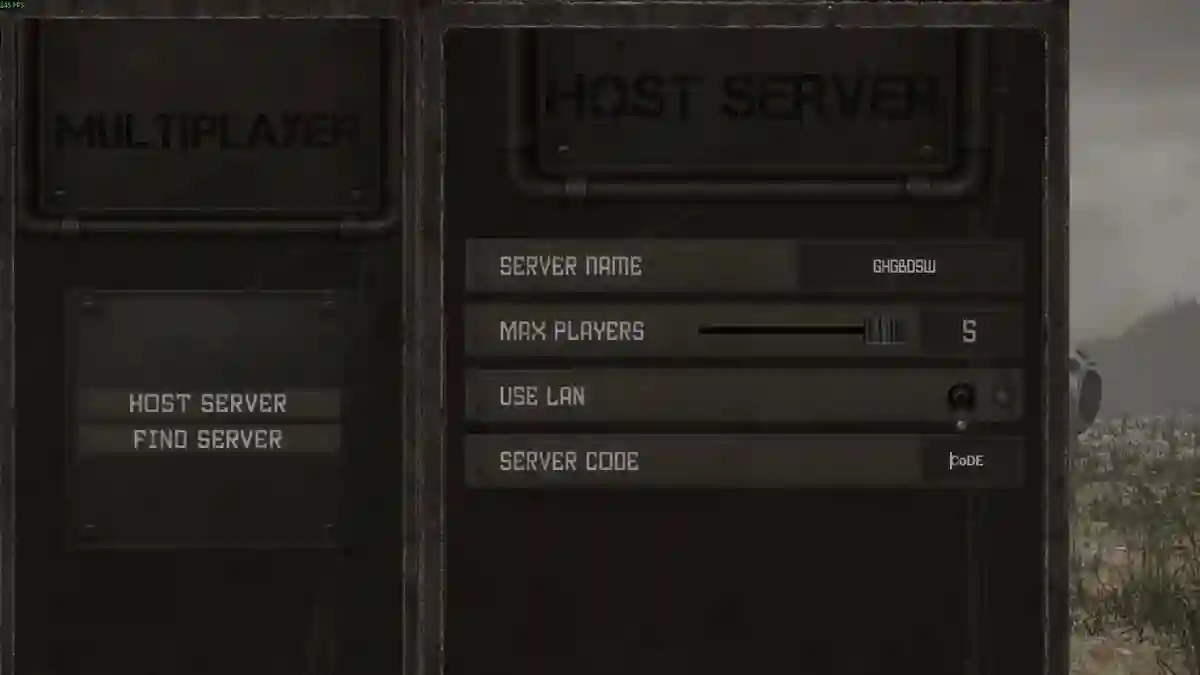
- Open Misery → Multiplayer.
- Select Host Server and create a new game.
- Set server name & max players.
- (Optional) Set a server code for friends only.
- Click Create Server.
- Press Shift + Tab, right-click friend → Invite to Game.
If they can’t join
- Friend must type the exact server code (not the name).
- Use a more complex code if the server doesn’t appear.
- Change the Steam download region if joining from another area.
- Avoid overly restricted visibility settings.
If you host a server with a code like ABC123, your friends can either join through the Steam invite or search for the server manually using that exact server code.
