

Bridger Western is a Wild West gunfighting, anime-style open-world game available on Roblox.
The game takes place in B Valley, a dangerous and lawless land filled with outlaws, hunters, and supernatural threats.
In the game, you play as a character entering B Valley to survive, gain power, and become stronger than others.

AI receipt scanner & cash envelopes. 100% private.
You can choose different lifestyles, such as Fisher, Gunslinger, or Hunter, to earn money (Moola), unlock weapons, horses, abilities, and obtain powerful Stands.
In this article, you will learn how to join and create gangs in Bridger Western, including a complete step-by-step guide.
How to Join & Create Gangs in Bridger Western
In Bridger Western, gangs are tied to Roblox Groups, so you cannot create or join a gang unless you have a properly set up Roblox Group.
Before you join or create a gang
You must meet these Roblox‑side requirements.
- Have a Roblox account.
- Join or create a Roblox Group.
- Put “bridgerwesterngang” in the group description (one word).
- Group name must be 50 characters or fewer.
- Creating a group costs 100 Robux (joining is free).
Create a gang (new Group)
Step 1: Create your Roblox Group
- Go to the Roblox website → Communities → Create.
- Fill in Group Name, Description & Emblem.
- Add “bridgerwesterngang” in the Description.
- Set to “Manual Approval”.
- Buy the Group for 100 Robux.
Step 2: Copy the Group ID
- Open your Roblox Group page.
- Copy the Group ID from the URL (big number after
/groups/).
Step 3: Register it in Bridger Western
- Launch Bridger Western and fully load the world.
- Press M to open the menu.
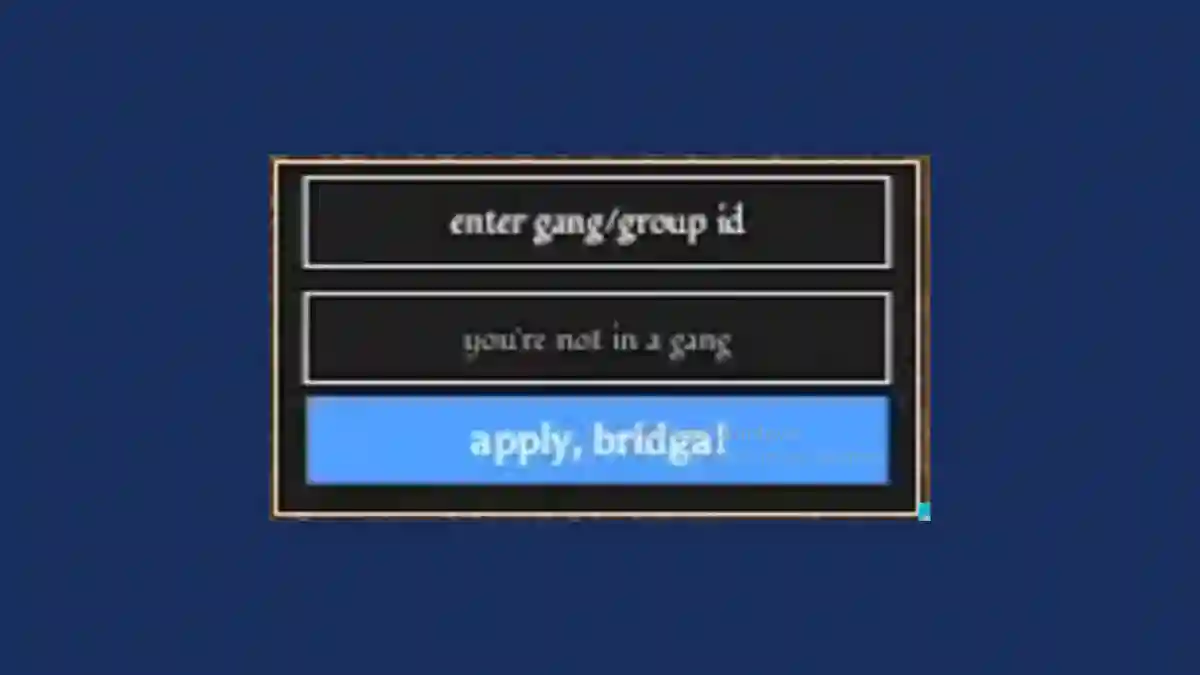
- Go to the bottom-right “enter gang/group id” field.
- Paste your Group ID.
- Click “apply, bridga!”.
- A new gang is created if none exists, or you join an existing one.
Once the Roblox Group is set up, all members of that group will display the same gang tag in-game, as long as they enter the same Group ID in Bridger Western.
Join a friend’s gang
- Join the same Roblox Group as your friend.
- In Bridger Western, press M to open the menu.
- Paste the Group ID in the “enter gang/group ID” field.
- Click “apply, bridga!”.
Your gang tag will appear in-game, and you will be grouped with all members of that Roblox Group.
